144p Test Suite (was: STN torture test)

This is an archive of a topic from NESdev BBS, taken in mid-October 2019 before a server upgrade.
View original topic
144p Test Suite (was: STN torture test)
by on (#216188)
This ROM was produced during early development of a Game Boy port of Artemio Urbina's 240p Test Suite, which I'd previously ported to NES. Techniques demonstrated:

  • Fading out the IPL logo
  • Drawing text in a variable width font (VWF), also called proportional font
  • Copying tile data to VRAM during horizontal blanking
  • Bank switching background tiles at line 72 using a STAT IRQ
  • Drawing half of a character as background and the other as flipped sprites
  • Ease-in, ease-out, and overscroll bounce for window
  • Making an excuse to skip leg day
  • No exceptions in BGB

The effect looks great on a Super Game Boy, Game Boy Color, or PC based emulator. On GBC or GBA, press Left+B to hide miscoloration of flipped sprites. But it's a smearfest on a Game Boy Pocket, with these analog artifacts:

  • Vertical smearing proportional to each pixel column's average gray level. This appears to be inherent in passive matrix super-twisted nematic (STN) displays.
  • Darkening of gray areas when large white area present. I'm not sure whether this is the fault of the Game Boy Pocket, which supplies less power than other models, or of the EverDrive GB X5, which draws more power than a single-game cart.
Re: STN torture test
by on (#216194)
Wasn't that bounce patented by Apple? ;)
Re: STN torture test
by on (#216215)
It's the same effect as a CSS transition using a curve similar to "easeOutBack" when showing and the "easeInBack" when hiding. Using cubic-bezier.com, I eyeballed it as similar in effect to cubic-bezier(.6,1.3,.8,1) when sliding in and cubic-bezier(.2,0,.4,-0.3) when sliding out.

According to the browser compatibility table for CSS transition timing functions, the free web browser Firefox added experimental support for CSS transitions in version 4 (2010) and unprefixed it in version 16 (2012), and the free web browser Chromium added support for CSS transitions in version 1 (2008) and unprefixed it in version 26 (2013). Apple WebKit gained specific support for overshooting transitions when the bug 45761 fix landed in September 2011, and WebKit is free software (LGPLv2) as well. If Apple were interested in asserting this patent for overshoot in ease-out for discrete show/hide transitions, as opposed to reaching the end of a continuous scroll range, we probably would have heard about it sometime in the past six years. More generally, it follows from two of Disney's basic principles of animation: squash and stretch and ease-in and ease-out. These have been around since the 1940s, as described in The Illusion of Life (F. Thomas and O. Johnston, 1981).
Re: STN torture test
by on (#216292)
Apple patented showing a texture or surface or material behind the item when it over scrolled. It's some super dupper design thing that makes it feel more real and less like a slab of glass or something... see also "Material design" by android ; So tepples is safe for now ;)
Re: STN torture test
by on (#216308)
I don't really have much to say besides that it looks pretty good. This is your first attempt at seriously diving into Game Boy (DMG) homebrew right? Very nice so far.
Re: STN torture test
by on (#216683)
I took the hint and lightened the background for the help and menu screens of this first preview of the 144p Test Suite.

0.01 (2018-04-10)
  • initial release with Grid, Linearity, Gray ramp, Solid screen, Sharpness, Grid scroll, Full screen stripes, About, Credits

Who would need something like this?

  1. Someone owns a Super NES console, Super Game Boy accessory, and EverDrive GB, but no Super EverDrive or SNES PowerPak.
  2. Someone owns a Nintendo GameCube console, Game Boy Player accessory, and EverDrive GB, but no GameCube homebrew device.
  3. Someone wants to see exactly how much a Game Boy (DMG) or Game Boy Pocket suffers from motion blur and STN smear artifacts.
Re: STN torture test
by on (#216688)
If you can keep it at 32kb with no mapper required, you could sell them through Catskull Games. Likely not a huge seller, but another income stream is always worth it.

edit: I imagine the main use will be testing screens for dead or damaged pixels, so gearing tests towards that could be useful. Maybe color support for GBCs?
Re: STN torture test
by on (#216696)
The "Solid screen" pattern can toggle across all four gray levels. Thank you for the suggestion to add dead pixels to its description.

I'll do my best, but I'm not certain I'll be able to fit a full Game Boy Color suite in 32K. I've used 23.5K of 32K already, and for a benchmark, the NES port uses 52K out of 64K. Mitigating that are a few factors:

  • A lot of tests don't apply to monochrome Game Boy systems, allowing me to leave out their CHR data. The planned GB-exclusive tests (Motion blur and STN smearing) aren't expected to use much CHR data.
  • Tile data for Linearity, Shadow sprite, and the Sonic/Kiki Kaikai wannabe scroll tests will be smaller on Game Boy due to the smaller screen with square pixels. This means that for (say) Linearity, I store one variant and calculate its grid at runtime, not four like I have to on NES (NTSC grid, PAL grid, NTSC no grid, PAL no grid).
  • I've already included CHR data for some unfinished tests (Vertical scroll test, Manual lag test, and part of Shadow sprite) but not others (Stopwatch, Hill zone scroll test).
  • I left my hello world demo accessible by choosing any test that I haven't started on. Once no tests are marked "NYA", its 2K of code and CHR data can be cut out.
  • Unlike the NES port, where I reused the PB53 tech I had built for Action 53 and RHDE, I haven't done anything with compression yet. Game Boy has more RAM for more compression, and I'll have fun figuring out how to make better use of it.
Re: STN torture test
by on (#216707)
tepples on gbdev forum wrote:
But not everybody can run 240p Test Suite.

A. Someone owns a Super NES console, Super Game Boy accessory, and EverDrive GB, but no Super EverDrive or SNES PowerPak.
It is not strictly true. The SGB contains facilities for downloading code into SNES RAM and running it. This should be enough to run a special version of the suite using only the hardware listed in A. This would also be a good idea if you want to display effects at the framerate of the SNES rather than the output rate of the onboard GB CPU. Even if you don't go full SNES on it, you could use SGB functionality to provide color to tests where this is relevant and fill the whole screen using the border.

One minor nitpick about the interface would be that I'd like to be able to read the about text for an individual test without first entering that test. As it is now, pressing start at the menu always shows the about screen for the whole ROM.
Re: STN torture test
by on (#216711)
tl;dr: SGB/GBC patches are welcome.

nitro2k01 wrote:
The SGB contains facilities for downloading code into SNES RAM and running it.

The official Super NES port of the 240p Test Suite was 512K last I checked, and the Super Game Boy allowed downloading only up to 64K last I checked. Is there source code for a Super NES program sending requests back to the Game Boy CPU so that it can request 4K of data at a time through the DATA_TRN mechanism? Is there public source code for loading and running native code on a Super NES through Super Game Boy at all? Or would I end up having to become the only developer other than the Taito devs who made Space Invaders to actually use DATA_TRN and JUMP?

nitro2k01 wrote:
This would also be a good idea if you want to display effects at the framerate of the SNES rather than the output rate of the onboard GB CPU. Even if you don't go full SNES on it, you could use SGB functionality to provide color to tests where this is relevant and fill the whole screen using the border.

As calima suggested above, one goal of this project is to fit it in 32768 bytes, the size of Catskull's $10 MBC-less flash cart. As a precedent for the practicality of producing Super Game Boy enhanced software small enough to fit in such a cartridge, which licensed Super Game Boy enhanced or Game Boy Color enhanced games are 32K? No-Intro's DAT-o-MATIC doesn't appear to have a way to filter by size, even if we assume that filtering by title "SGB Enhanced" is reliable. If no such games exist, then who manufactures production cartridges larger than that?

In addition, with my obligations to my employers (plural), I may not be able to produce a Super Game Boy enhancement patch, a Game Boy Color enhancement patch, and a Game Boy Advance port (which someone on Shmups Forum requested after I announced this there) on my own any time soon. Once I complete the mono version, I am willing to review such patches provided by you, calima, or anyone else.

nitro2k01 wrote:
One minor nitpick about the interface would be that I'd like to be able to read the about text for an individual test without first entering that test.

In this post, I have passed along this nitpick to the maintainer. I think the main sticking point is what button binding would be used to show each test's help page on each supported platform.
Re: STN torture test
by on (#216716)
tepples wrote:
The official Super NES port of the 240p Test Suite was 512K last I checked, and the Super Game Boy allowed downloading only up to 64K last I checked. Is there source code for a Super NES program sending requests back to the Game Boy CPU so that it can request 4K of data at a time through the DATA_TRN mechanism? Is there public source code for loading and running native code on a Super NES through Super Game Boy at all? Or would I end up having to become the only developer other than the Taito devs who made Space Invaders to actually use DATA_TRN and JUMP?
No such source code exists publicly to my knowledge. What does exist is documentation of the hardware used for communicating through the SGB cartridge. With that info, I think the limiting factors (other than time of course) is one's knowledge of the SNES architecture, as well as access to debug tools. At least Higan emulates SGB.

tepples wrote:
As calima suggested above, one goal of this project is to fit it in 32768 bytes, the size of Catskull's $10 MBC-less flash cart. As a precedent for the practicality of producing Super Game Boy enhanced software small enough to fit in such a cartridge, which licensed Super Game Boy enhanced or Game Boy Color enhanced games are 32K? No-Intro's DAT-o-MATIC doesn't appear to have a way to filter by size, even if we assume that filtering by title "SGB Enhanced" is reliable.
If the query is games licensed by Nintendo, I'm fairly certain there are no examples. But I can mention my own port of Flappy Bird. Even though it's a simple game, there's quite a lot of graphics in it. Including an as mentioned, SGB border graphics, intro screen, multiple animation frames for the bird, certain graphics that are different in GB and GBC mode as well as multiple easter eggs. But there you have an example a 32k game that is both SGB and GBC enhanced, and it was sold on cartridge. Attached is the ROM and a screenshot of it SGB border.

Some size stats about the game:
(Almost) all graphical assets are compressed using my shoddy homebrew compression algorithm. To take the SGB border as an example:

Uncompressed size
Tile data: 8192 bytes
Attribute map: 2048 bytes
GB map data used for the data transfer: 448 bytes
Total: 10688

Compressed size
Tile data: 5185 bytes
Attribute map: 742 bytes
GB map data used for the data transfer: 21 bytes (That data is mostly sequentially incrementing tile numbers so it compresses extremely well in my compression encoding. But that's one of the things it was optimized for.)
Total: 5948 bytes

A tally of all graphical assets (uncompressed) comes out to 28200 bytes, whereas the complete ROM (code+compressed graphics) is 27785 without slack.

Attachment:
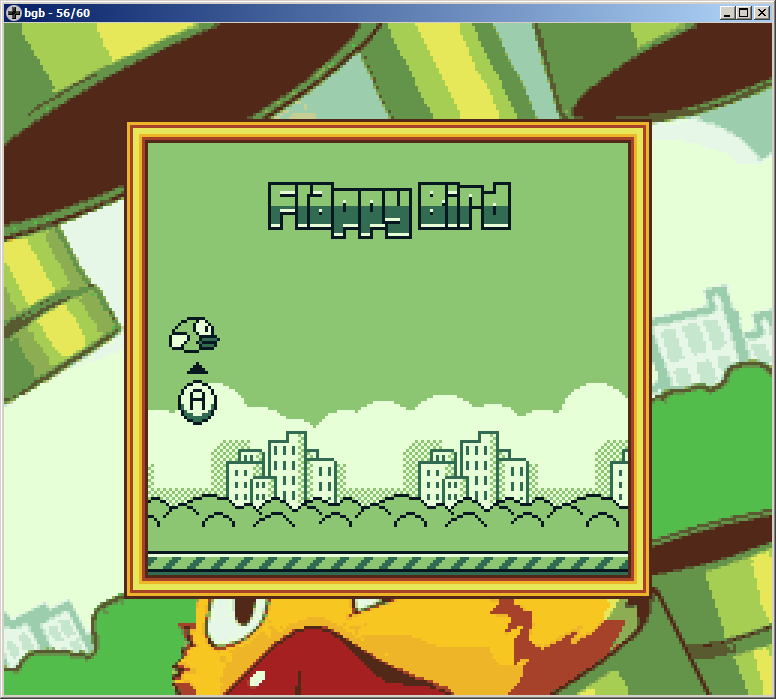
flap_sgb.png
flap_sgb.png [ 47.25 KiB | Viewed 9220 times ]


With that said, what takes up the most space in any game is likely graphics as well as level data. The test suite will have no level data and could cut down the data considerably by restricting itself to the more utilitarian tests and skip for example the Sonic screen. The graphics used in the more utilitarian tests would compress well, owing to their mostly repetitive nature. There's nothing intrinsic about SGB that would make the ROM big, other than actual size of the graphics. I realize, though, that at that point we're discussing a whole new product.

tepples wrote:
If no such games exist, then who manufactures production cartridges larger than that?
There's nothing special about a SGB cart, so if all you want is a physical cartridge for a release, there are various ways. Just let people run it on their own flashcarts. You could buy the cheap knock-off games from eBay or Aliexpress, which are often reflashable. That could be a cheap way of getting something out, although those carts often a bit flaky.

tepples wrote:
In addition, with my obligations to my employers (plural), I may not be able to produce a Super Game Boy enhancement patch, a Game Boy Color enhancement patch, and a Game Boy Advance port (which someone on Shmups Forum requested after I announced this there) on my own any time soon. Once I complete the mono version, I am willing to review such patches provided by you, calima, or anyone else.
That, I totally get. What could theoretically be done, and what one person could do on their own given their available time are different things. I'll put it on the todo list.

tepples wrote:
In this post, I have passed along this nitpick to the maintainer. I think the main sticking point is what button binding would be used to show each test's help page on each supported platform.
My counter-nitpick would be that it's not that it would be needed per se, it's just what I expected the button to do. Why have a dedicated button for showing the about screen, when there's a menu item for it. Remove that keybinding and reuse it and there should be no problem with any lack of buttons. Although that's just my stupid opinion.
Re: STN torture test
by on (#216724)
nitro2k01 wrote:
What does exist is documentation of the hardware used for communicating through the SGB cartridge. With that info, I think the limiting factors (other than time of course) is one's knowledge of the SNES architecture, as well as access to debug tools. At least Higan emulates SGB.

How would I set that up? There appears not to be HLE for the SGB firmware, and I'm told Game Boy boot ROM is hard to dump.

nitro2k01 wrote:
My counter-nitpick would be that it's not that it would be needed per se, it's just what I expected the button to do. Why have a dedicated button for showing the about screen, when there's a menu item for it. Remove that keybinding and reuse it and there should be no problem with any lack of buttons.

I'll pass that along. I'm looking to keep buttons as consistent with the Super NES version as possible, so whatever Artemio does with that one, I'll probably end up doing with the GB and NES versions.
Re: STN torture test
by on (#216737)
tepples wrote:
How would I set that up? There appears not to be HLE for the SGB firmware, and I'm told Game Boy boot ROM is hard to dump.
Thankfully, I host the various boot ROMs.

Todo: Add a hash list to that page for discoverability for people who may be looking for those files. Add the GBC boot ROM.

Edit: Added the aforementioned things and an expanded readme.
Re: STN torture test
by on (#216872)
I came up with a GB/SNES counterpart to PB8, a CHR data codec used in the new version of the Who's Cuter demo and the Haunted games. (PB8 is LZSS with a fixed distance and length of 1, or equivalently RLE with unary-coded run lengths. PB53, used in Action 53, is PB8 with a couple ad hoc optimizations for NES tiles.) To make RLE effective on GB, you need to change the fixed distance to 2. I was inspired by the RLE tile codecs used in Master System games, which store the data bitplane-major before compression (like NES tiles) rather than row-major (like Master System and Game Boy tiles) and then reinterleave the data when copying it to VRAM.

I also dug up the text coder that I had for made for my NES port of robotfindskitten. Byte pair encoding (BPE), also called digram coding or (in the ROM hacking community) dual tile encoding (DTE), is a way of compressing text by mapping otherwise unused high-numbered code units to pairs of characters. For example, code units $20-$87 might be your ASCII code plus a few accented glyphs, and $88-$FF would represent pairs of characters. Recursive BPE, or digram tree encoding (DTE), also allows one or both of the pairs to refer to another (lower-numbered) pair.

0.02 (2018-04-14)
  • Solid screen: Mention dead pixel test (requested by calima)
  • Compress most tile graphics with PB16, saving about 1.25K
  • Compress help text with DTE, saving about 3.5K
  • Add tests: Shadow sprite, Hill zone scroll, Vertical scroll, and Stopwatch

These tests remain: Overscan, Manual lag test, Motion blur, STN smearing, Sound test, Audio sync
Re: STN torture test
by on (#216966)
Stick a fork in it 'cause I think it's done, unless someone wants to contribute a patch for SGB or GBC support. There's about 6K left without having to step up to an MBC.

0.03 (2018-04-17)

  • Add Overscan, working around a mono hardware bug with WX=166
  • Add Audio sync, Manual lag, Sound test, and Motion blur
  • Help: When displaying the same page as last time, don't move the window out and back in
Re: STN torture test
by on (#216975)
Out of curiosity I tried comparing my own compression algorithm to PB16.

greenhillzone.u.chrgb:
Uncompressed: 1744 bytes
PB16: 921 bytes
Mine: 1082 bytes

I think this is basically down to encoding since I use a multibyte encoding So for example, it takes a 3 byte sequence to start a backtrack operation, the command byte, how many bytes to backtrack, and how many to copy.

greenhillzone.nam:
Uncompressed: 576 bytes
PB16: 400 bytes
Mine: 373 bytes

Mine does better, but this is expected since mine encodes sequences, which is beneficial for map data. All PB16 can do in this case is to eliminate repeated data which is basically only repetitions of the same tile in this file.

Note that there's one (perhaps irrelevant) example where mine radically beats PB16, namely tiles that didn't get the unique treatment.

greenhillzone.chrgb:
Uncompressed: 9216 bytes
PB16: 3876 bytes
Mine: 1534 bytes

The reason is that mine has a 512 byte offset reach for backtrack. When encoding the non-unique tite version, a backtrack offset of 257-512 bytes back was used a total of 35 times for this file. Of course, the non-unique'd tile data would not even fit in memory, so it's a moot point in this case. For context, I added deep backtrack to help compress music files which were 8 kiB big (ie would fill all of WRAM) where this made a huge improvement.
Re: STN torture test
by on (#217001)
@tepples
Please don't filebomb, zip files should extract to a directory, not have a ton of top-level files.
Re: STN torture test
by on (#217002)
More numbers, just because :P

greenhillzone.u.chrgb:
Uncompressed: 1744 bytes
PB16: 921 bytes
nitro: 1082 bytes
lz4hc: 1052 bytes
zlib: 877 bytes

greenhillzone.nam:
Uncompressed: 576 bytes
PB16: 400 bytes
nitro: 373 bytes
lz4hc: 400 bytes
zlib: 348 bytes
Re: STN torture test
by on (#217003)
I admit that filebombing has been a problem with my automatic zip packaging dating back to at least 2009 with Concentration Room.

In man 1 zip I couldn't find an option to prepend a directory name to all files that shall be added to an archive. Is there a different program people should use that supports this? Or would I have to write a script that creates a new subdirectory, copies all files that shall be included in the zipfile to that subdirectory, adds that subdirectory to the zipfile using zip -r, and removes that subdirectory recursively?

EDIT: I wrote an anti-filebomb script, which will be included in the tools folder of the next version and hopefully my other projects.
Re: STN torture test
by on (#217032)
Nowadays you'd have your projects in git, and use "git archive --prefix mydir/ --format zip HEAD > myfile.zip".
Re: STN torture test
by on (#217034)
tepples wrote:
In man 1 zip I couldn't find an option to prepend a directory name to all files that shall be added to an archive. Is there a different program people should use that supports this? Or would I have to write a script that creates a new subdirectory, copies all files that shall be included in the zipfile to that subdirectory, adds that subdirectory to the zipfile using zip -r, and removes that subdirectory recursively?

Sounds wasteful I/O-wise. I know you run *IX, so: if you can get a list of filenames you know definitively are supposed to be in the resulting zipfile, then just use a symlink to get what you want; zip by default will automatically follow symlinks (there's a weird extension that actually can back up symlinks but uh, yeah, don't use htat), so here's a crummy example:

Code:
$ cd ~
$ mkdir -p example
$ touch example/include1 example/include2 example/include3 example/do_not_include
$ perl -e 'print "abc\n"x999999' > ~/example/hello4
$ ls -l example
total 135
-rw-------    1 jdc       users           0 Apr 18 00:54 do_not_include
-rw-------    1 jdc       users     3999996 Apr 18 00:54 hello4
-rw-------    1 jdc       users           0 Apr 18 00:54 include1
-rw-------    1 jdc       users           0 Apr 18 00:54 include2
-rw-------    1 jdc       users           0 Apr 18 00:54 include3
$ cd /tmp
$ ln -s ~/example prepend
$ zip result.zip prepend/hello4 prepend/include1 prepend/include2 prepend/include3
  adding: prepend/hello4 (deflated 100%)
  adding: prepend/include1 (stored 0%)
  adding: prepend/include2 (stored 0%)
  adding: prepend/include3 (stored 0%)
$ rm -r prepend
$ unzip -l result.zip
Archive:  result.zip
  Length     Date   Time    Name
 --------    ----   ----    ----
  3999996  04-18-18 00:54   prepend/hello4
        0  04-18-18 00:54   prepend/include1
        0  04-18-18 00:54   prepend/include2
        0  04-18-18 00:54   prepend/include3

You could probably use -r with this to include a directory as well (ex. prepend/directoryname), assuming you wanted everything in there.

The prepend/hello4 prepend/include1 prepend/include2 prepend/include3 part of the zip line is what you'd have to figure out how to provide through a scripted manner. If the number of files/arguments to zip becomes long, thus exhausting argv space, or contain "painful characters" (like spaces): zip also has an -i/--include argument that can be given a value of @filename.lst. What to include pathname-wise will be read from filename.lst instead of from the command line, so you could just make something that generates filename.lst and then refer to it in the above manner (zip result.zip --include @/path/to/filename.lst).

The symlink method just acts as a crappy way to accomplish what you want, without having to copy a ton of data. You don't have to use the paths/methods I described, but it's one way. I imagine a filesystem loopback mount ("nullfs mount" on BSD) could work just as easily; on Linux this is done through mount --bind, IIRC. You still would need a list of the files though.

But if this is actually being done on Windows, then NTFS offers symlinks (I don't know how well they work). You can alternately (and probably a better idea) use NTFS junctions (I use these and they work well). mklink.exe that comes with Windows Vista or later can manage all this.
Re: STN torture test
by on (#217040)
I would say it is up to whatever extracts the files to provide a folder/directory for files to go into (which is default behaviour in all the archival programs I use). I absolutely dislike archives that have the files in a folder/directory inside it, one extra step for me to get rid of output dir to prevent having a new dir with yet another one in it rather than just the files I'm after.
Re: STN torture test
by on (#217051)
@calima
Thanks for pointing out the --prefix argument to git archive. I must have missed the first time I read man git-archive. I had been using git ls-files to construct a list of files piped into zip -@; see for example the makefile for Pently.

I tend to dislike makefile rules that write the target file even if the program exits with an error, as Make then considers a file "built" even if it is empty or otherwise not valid. But I discovered that if you use -o instead of >, you don't need --format. The form with > is better for piping into things like gzip, though git config already understands .tar.gz and can have additional compressors added through git config.

So something like the following rule (untested) might work:
Code:
$(title)-$(version).zip: $(title) makefile README.md
<HT>git archive --prefix $(title)-$(version)/ -o $@ HEAD

(The <HT> represents a tab character, which doesn't survive phpBB.)

But the other problem with git archive is that it contains only files in the repo (that is, source code), without a way to specify files to include that are only in the working copy and not in the repo (such as the executable). I had been producing zipfiles containing both ROM and source code to make distributing the complete corresponding source code easier than not doing so. Adding the file later with zip would put it at the top level, not inside the relevant folder.

@koitsu
I considered ln -s briefly until I remembered that contributors to some of my other projects use Windows. Windows gained symbolic links fairly recently in the form of the mklink command, available to normal users in Windows 10 Creators Update and later. But several aspects of mklink confuse me: why it uses the opposite argument order from ln -s (and from the existing copy command in Windows) is beyond me, why it needs the extra /D flag when a link happens to point at a directory, and why Windows required administrator privilege to create a symbolic link prior to Windows 10 Creators Update. I don't want to have to make the makefile call powershell Start-Process (something) -Verb RunAs (as described in this Super User question) to make the symbolic link, make the archive, remove the symbolic link, and then somehow fix the permissions on the resulting file. Nor do I want to require users of Windows 7 to upgrade to Windows 10.

@TmEE
During research for my previous post to this topic, I noticed that "tarbomb" and "zip bomb" have different meanings. A "tarbomb" is an archive with more than one top-level member, and a "zip bomb" is an archive that decompresses to a set of files several orders of magnitude larger, so as to confuse antivirus software that scans nested archives. Does this reflect different expectations of directory structure on the part of users of tar and zip formats?
Re: STN torture test
by on (#217054)
YMMV, but for .zip files I don't think it's standard in any way to have all of the contents in a single top-level directory. I've always seen far more .zip files which don't have the top-level directory. That's just the way things are. For .tar.gz and other unixy formats the situation is different.

I've seen some archivers which create a new directory for the contents unless one exists in the archive already. I'd just use something like that instead of expecting the rest of the world to change their habits. (Should be fairly easy to write a script to automate this.)
Re: STN torture test
by on (#217796)
It has come to my attention that someone does want to make a GBC port. To prepare for this, I have made some behind-the-scenes technical changes to 144p Test Suite.

0.04 (2018-04-29)

  • No more tarbombing: Create zipfile with all files in an internal folder (requested by calima)
  • Skip logo fadeout and SGB detection on Game Boy Color/Advance
  • Overscan: Start border thickness at 2 instead of temporary values left in from testing
  • Overscan: Draw bottom border with WX instead of LCDC (requested by ISSOtm)
  • Stopwatch: Hide face with window instead of LCDC (requested by ISSOtm)
  • Hide incomplete first frame with BGP and OBP0 instead of LCDC (requested by ISSOtm)
  • Vertical scroll: Fix a buffer overflow causing the test to start paused
  • Use de facto standard hardware.inc, with 'r' in front of all port names (requested by ISSOtm)
  • Grid test pattern no longer uses Sharpness help screen
Re: STN torture test
by on (#218305)
Now on GitHub: pinobatch/240p-test-mini
Re: STN torture test
by on (#218871)
I have begun work on adding Game Boy Color enhancements to the following activities:

  • Activities using help engine (menu, About, Credits, Sound test)
  • Vertical scroll
  • Lame boy demo

I have determined that the following could benefit from enhancement (issue #2):

  • Gray ramp
  • Motion blur
  • Solid screen
  • Shadow sprite
  • Hill zone scroll

I have further determined that the following tests, which were left out due to lack of color, should be included for feature parity with ports on other consoles (issue 1):

  • PLUGE
  • Gradient color bars
  • SMPTE color bars
  • Color bars on gray
  • Color bleed

But I doubt that I will be able to fit everything in 32K. I started with 26K used and 6K free. After adding the GBC enhancements that I have added so far, I am up to 27.4K used and 4.6K free. Some of this is because some parts need GBC-specific graphics to distinguish, for example, white-as-backdrop from white-as-skin-color from white-as-shirt when two of them occur in the same tile. Once I near the 32K limit of easily obtained flash carts that are less expensive than SD adapters, could anyone here assist in code review to find things I could pack smaller?
Re: STN torture test
by on (#218872)
tepples wrote:
Once I near the 32K limit of easily obtained flash carts that are less expensive than SD adapters, could anyone here assist in code review to find things I could pack smaller?


I'd be willing to take a look. No promises, but I'll take a peek when you're ready.
Re: STN torture test
by on (#218994)
Currently building the gameboy subtree of the repository produces a binary of which at least 27 KiB is used. Do you want to start the review now, or would you prefer to wait until I hit 31 KiB?
Re: STN torture test
by on (#219030)
I'll start taking a look this weekend. Not sure how much I can help, but I'll try.
Re: STN torture test
by on (#219172)
0.05 (2018-05-30)

  • Fix Linearity corruption after closing help (0.04 regression)
  • Add GBC enhancement for menu/help, Grid, Gray ramp, Solid screen, Motion blur, Shadow sprite, Scroll test, Vertical scroll test, and Lame boy demo (requested by calima)

I now have 1726 bytes left to make PLUGE, Gradient color bars, SMPTE color bars, Color bars on gray, Color bleed, and their respective help pages. I might not be able to fit everything unless someone can help me find where I'm wasting space.
Re: STN torture test
by on (#219200)
Does anyone here have a GameCube, a Game Boy Player, an EverDrive GB (or other Game Boy compatible flash cart), and a way to measure IRE levels? If so, I'd like you to try this, select "Solid color screen" (that is, White & RGB Screen) or "Motion blur" (which extends 100 IRE), and figure out what signal levels the GameCube is producing for shade 0 through 31. This should help me figure out the appropriate Game Boy Color RGB levels that correspond to 0, 7.5, and 100 IRE for the color balance tests.

And after adding draft help text for the (yet-to-be-developed) GBC-exclusive tests, I think I have about 600 bytes free. So yeah, I'll need help with the compression before I can turn my mockups into code.
Re: STN torture test
by on (#219208)
Yes to #s 1,2, and 4. I've been meaning to build something for #3 for a while but haven't gotten around to it.
Re: STN torture test
by on (#219308)
I guess you could order a 32K cart with 144p Test Suite 0.05 and measure levels that way.
Re: STN torture test
by on (#219313)
Or get around to building the simple design I floated 6 months ago...
Re: STN torture test
by on (#219336)
It took heroic compression, but I was able to add the color balance tests with 127 bytes to spare.

0.06 (2018-06-03)

  • Add GBC-exclusive tests (PLUGE, Gradient color bars, SMPTE bars, Color bars on gray, Color bleed)
  • Assembly source files use .z80 extension for more convenient syntax highlighting
  • Backlight zone background is black, not green
  • Motion blur, Overscan, and Lame boy demo share 0-9 tiles
  • Better compression for tile maps using many tiles only once
  • Lame boy demo no longer shows RNG test
  • Eliminate some unnecessary ROM byte alignment
Re: STN torture test
by on (#219434)
I tried 0.06 in my GBC and I get a black screen after the manual lag test. It does not report the average latency, but I can get off the screen by pressing a button. Otherwise the new features are good. The test works as intended on my AGB-001 and AGS-101
Re: STN torture test
by on (#219436)
After a bit of experimentation, I got it to trigger on a DMG too. It has nothing to do with the Game Boy model and everything to do with the lag value on the final press. When the reticles are overlapping while audio is on, the background is black for one frame (see megaton.s lines 261-274). If an A press during this frame causes the test to advance to the result screen, the screen remains black because the result screen does not modify the palette.

This is fixed in this commit, and the fix will be included in the next release. Thank you for reporting this.
Re: STN torture test
by on (#220460)
I decided to skip versions 0.07 through 0.16 in order to align numbering with the NES suite. Version 0.17 fixes, among other things, the black screen in Manual lag when the tenth A press is at 0 frames. See the release announcement for details.
Re: 144p Test Suite (was: STN torture test)
by on (#242081)
I've found that code golfing alone rarely frees enough space to add a new feature. Eventually I need to sit down and look at asset data to find patterns I can compress better. In my case, exploiting the reflection symmetry of Linearity and the fact that unique tiles tend to cluster together in a tilemap freed enough space to let me add Super Game Boy palettes, but not quite enough for a custom border.

(Emulator screenshots below. See also photos of a TV in this Tweet)
Re: 144p Test Suite (was: STN torture test)
by on (#242129)
That attribute clash on the Green Hill test looks so "SGB"... I guess the reason why it's so noticeable, though, is because you're only encoding horizontal strips?
Re: 144p Test Suite (was: STN torture test)
by on (#242140)
Correct. There's not much more I can do when the display can scroll under the attributes.

SGB attribute clash is both better and worse than attribute clash on another well-known video game platform with an 8080-family CPU: the ZX Spectrum. It's better because I have three foreground colors per 8x8 pixel area, but it's worse because I can't quickly update the whole screen's attributes in response to camera movement.
Re: 144p Test Suite (was: STN torture test)
by on (#242167)
Oh, yeah, I forgot it could scroll. If so, then I guess this is the least awkward-looking way.
Re: 144p Test Suite (was: STN torture test)
by on (#242385)
When I originally started the Game Boy port, I thought I wouldn't be able to fit both full SGB enhancements and full GBC enhancements. But I've since gained a level in data compression. After some heroic Huffman coding of several activities' CHR data, I ended up squeezing in a border.

Attachment:
bgb00002_8.png
bgb00002_8.png [ 6.34 KiB | Viewed 937 times ]


The Huffman coding could in theory benefit the NES version as well, but I'm not doing it there because right now, the cache of Huffman decoded data occupies about 7K out of the Game Boy's 8K WRAM. Without a cache, changing from one activity to another or closing the help screen is painfully slow, as in half a second on a blank screen.