How can I benchmark my C code?

This is an archive of a topic from NESdev BBS, taken in mid-October 2019 before a server upgrade.
View original topic
How can I benchmark my C code?
by on (#242314)
Hi!

I'm writing a game framework in C and I would like to benchmark my code.
I've tried including <time.h> and using the clock, but it seems that the NES doesn't have one... (please correct me if I'm wrong).

The emulator (Nestopia, Mesen, FCEUX) always displays 60fps, which does not reflect the game's internal speed.
I've tried using the Lag Counter, but that's not exactly what I'm after.

In Python, I would do it like this:
Code:
from time import time
def main_loop:
    timestamp = time()
    ...
    do_heavy_stuff()
    ...
    ...
    fps = 1 / (time() - timestamp)
    print(fps)


Do you guys know any way to achieve this, in either C or inline assembly?

If not, what the alternative? How do you guys benchmark your code?

Many thanks in advance. :)
Re: How can I benchmark my C code?
by on (#242318)
The simplest thing I can think of is have a variable that ticks up counter++ at the end of the code.

Have the linker print a labels file to know where in memory that variable is.

Run the game in an emulator with a debugger, and open a RAM viewer, and time that variable with some external clock, perhaps a video camera (phone). If you know how many it goes per second, divide 60 by it to know how many lag frames.

On the other hand.. FCEUX can advance 1 frame at a time with (I think) backslash \ button. You could have the RAM viewer open and just click that button until the RAM ticks up 1.
Re: How can I benchmark my C code?
by on (#242324)
Quote:
The emulator (Nestopia, Mesen, FCEUX) always displays 60fps, which does not reflect the game's internal speed.


It's not obvious what you're exactly trying to do here, but a few comments: On the NES (unlike modern platforms), unless you're doing something non-standard, you usually want to tie your main game logic loop to the 60fps that the NES natively runs at. It's theoretically possible to run the main loop at a different speed, and have your NMI interrupt just render things (almost like having 2 threads), but for various reasons, it's a bad idea in most cases.

So that said, is your main logic consistently taking longer than one native frame? If so, many of the trivial benchmarking techniques fall apart a little bit. You just need to get it down to less than a frame.

If it's already taking less than a native frame, and you want to see how much of the native frame you're using, the easiest thing to do is use the grayscale bits of the PPU -- turn on the grayscale bit of $2001 at the beginning of your logic, then turn it off at the end of the logic. You'll be able to quickly see how much time is used by the chunk of logic, by seeing what percentage of the screen is gray.
Re: How can I benchmark my C code?
by on (#242332)
You can design the game to run at 30 Hz or 20 Hz.

You would put a counter in the NMI code, and only loop the game code if that counter is >= 2 *... resetting it at the start of the game code to zero.

* (or >= 3 for 20 Hz)
Re: How can I benchmark my C code?
by on (#242339)
Indeed, playing around with the frame count doesn't help you much and the NES doesn't have an internal time value as far as I know.


As gauauu suggested, the easiest way to see how much time a specific code requires is indeed the PPUMASK bit setting. Let me explain it a bit more in detail:

The PPUMASK ($2001) has three bits to emphasize red, green and blue. I.e. independent from all the regular colors, you can put, for example, a red layer over the whole screen, "Space Invaders"- or "Doom"-style, if you want:
https://wiki.nesdev.com/w/index.php/PPU ... _.3E_write

It's pretty much a very simple transparency effect.
"Noah's Ark" used this for the parts of the screen that are underwater:
http://www.youtube.com/watch?v=oz46tCrZkLI&t=1m

So, you write a new value to PPUMASK before the code that you want to measure starts.
And you reset the value to its old value afterwards.

Setting these bits takes effect immediately, so you see a stripe of overlaid colors somewhere on the screen. The bigger the stripe, the longer your measured code takes.

(fceux only shows these overlays as full lines which is mostly good enough for measurement. But Nestopia uses the more NES-accurate way of setting and resetting the values on a pixel level.)


By the way, if you're only worried whether your game lags at all: fceux has a menu point "Config", "Display", "Lag Counter". Whenever the emulator detects that you didn't read the controller once per frame (i.e. your game logic obviously hasn't started anew since the last NMI), it increases the value.

dougeff wrote:
You can design the game to run at 30 Hz or 20 Hz.

This is a horrible advice. Have you seen the games that run at less than 60 fps? "Soccer" and "Ghosts'n'Goblins" are a mess. And "Ikari Warriors" is the worst.
Re: How can I benchmark my C code?
by on (#242341)
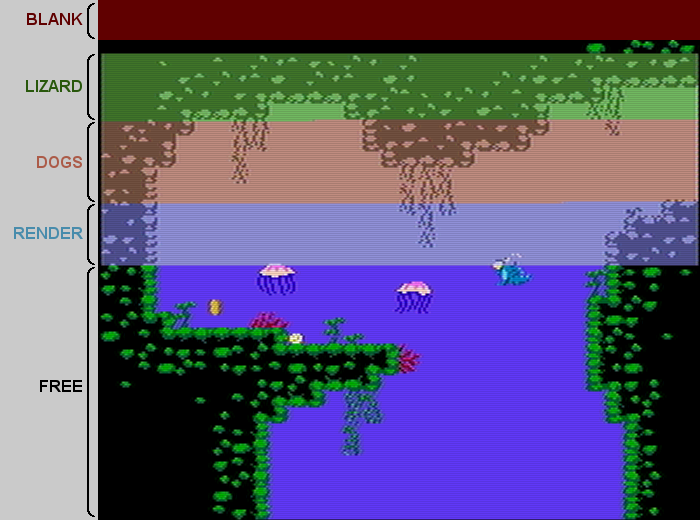
Here's a diagram of how using that technique looks visually. Basically each scanline becomes a visual timer with ~15,000Hz resolution.
Image

This is from an article I wrote about the technique as I was using it for my game:
https://www.kickstarter.com/projects/1101008925/lizard/posts/1040806

By the way, Mesen's "event viewer" will let you do this sort of thing with arbitrary events appearing as dots. You can set a disabled breakpoint and have it appear in the event viewer to mark the timing.
Re: How can I benchmark my C code?
by on (#242347)
For general how is this going - using "raster time" as rainwarrior has shown is the typical method. If you are after actual hard numbers though..
compile your code for the C64, load it up in vice. enter the monitor
break <end address>
sw reset
g start address
then when it finishes you will get the number of clocks it took at the end of the break code line

this will not be 100% accurate if its a long function as the internal IRQ will kick in, so you need to do a CLI before you start, this will still affect you with badlines.. which will be consistent but if you want to remove them
>d011 0
x
enter monitor again
this will disable the screen and hence avoid badlines. there are still DRAM refresh cycles so its not 100% to the clock but its getting "good enough"

alternatively you can use https://github.com/martinpiper/BDD6502 and run the function, when it complete it will then tell you how many cycles it ran for, and this will be pure clocks with nothing else running.
Re: How can I benchmark my C code?
by on (#242348)
Oh, yeah also FCEUX and Mesen can both count cycles between breakpoints: If you put a break at the start and end of what you want to measure, run to the start (break), hit run again and it will break at the end. In FCEUX the cycle count appears in the right middle area of the debugger. In Mesen it appears in the status bar at the bottom.
Re: How can I benchmark my C code?
by on (#242354)
Thanks for the suggestions guys! :0

I think I'll try to implement the grayscale/color trick using PPU register $2001.

So, if I understood correctly, in my C code, can I do it like this?

Code:
...
char *ppu2001;
...
...
void main() {
    ...
    ...
    ppu2001 = (char*)0x2001;
    ...
    ...
    while (1) {
        ppu_wait_nmi();
       
        // Set the first bit
        *ppu2001 |= 0x01;
       
        ...
        do_stuff();
        ...
       
        // Clear the first bit
        *ppu2001 &= ~0x01;       
    }
}


Sorry in advance if I'm suggesting something stupid... :|

Edit: Corrected the code.
Re: How can I benchmark my C code?
by on (#242355)
As far as I'm aware, you cannot just read from PPUMASK (i.e. 0x2001). On the NES, it's a write-only address. So, you should save the value that you originally set to PPUMASK in a variable. (Or, since the value will probably not change throughout the game, in a constant/macro.) And then you write the new value before your function and the old value after your function.

Besides, it looks like your syntax isn't quite correct:
Code:
char *ppu2001;
ppu2001 = (char*)0x2001;
ppu2001 |= 0x01;

Line 1: You have a pointer to a single byte value. Alright.
Line 2: You set the address 0x2001 to this pointer. Also alright.

Line 3: You OR-connect the address, not the value, with 1. This is what you do:
ppu2001 = 0x2001 | 0x01

What you wanted is:
Code:
*ppu2001 |= 0x01;

i.e. "take the value that is at the address that your pointer points to and OR-connect this value with 1".

(If you haven't, you should read about C and pointers and what the * and & operator mean in certain different situations.)

However, as I said, in this specific case, the 0x2001 address is write-only on the NES, so the code above is valid in general C, but still incorrect in this specific situation on the NES.

You need to do this:
Code:
*ppu2001 = PPU_MASK_VALUE_GRAYSCALE;
do_stuff();
*ppu2001 = PPU_MASK_VALUE;

And of course you declare:
Code:
#define PPU_MASK_VALUE 0x1E
#define PPU_MASK_VALUE_GRAYSCALE (PPU_MASK_VALUE | 0x01)

(Or whatever value your PPUMASK is supposed to have and whatever intensify or grayscale bits you want to set.)

Also, you shouldn't waste a pointer variable on this. Firstly, it's a waste of RAM, secondly cc65 is quite wasteful with pointer work since it always copies the pointer to its own internal temp pointers first before the value is accessed. Which in itself would count into the time that you want to measure.

The following code should work just as fine and have the compiler set the value in the most direct way possible:
Code:
*((char*)0x2001) = PPU_MASK_VALUE_GRAYSCALE;
Re: How can I benchmark my C code?
by on (#242356)
DRW wrote:
The following code should work just as fine and have the compiler set the value in the most direct way possible:
Code:
*((char*)0x2001) = PPU_MASK_VALUE_GRAYSCALE;

It wouldn't hurt to also mark it as volatile, just to make sure the compiler doesn't try to optimize it (e.g. do it in a slightly different order).
Re: How can I benchmark my C code?
by on (#242359)
It is indeed standard practice to use the volatile keyword for MMIO registers in C...

Though, for CC65 "volatile" is kinda weird. I think it ends up disabling all optimizations for the whole function it's used in, which might not really be the desired effect, especially if the function is long.

As a general rule, my recommendation for CC65 is to do all MMIO register access in assembly directly. For this case I'd just make a small assembly function to call from C:
Code:
// in a C file
extern set_2001(unsigned char value);

// call this where you want to set it
set_2001(0x1F);

; in an assembly file
export _set_2001
_set_2001:
    sta $2001
    rts


CC65's optimizer can't reorder function calls like that, so that's probably closer in behaviour to what other compilers do with "volatile".

You can set MMIO registers directly in C, but there are a bunch of ugly complications that may result from doing this. Aside from potential reordering, there are several other effects (e.g. accidental double-writes) that are easy to stumble on. The exact syntax proposed in posts above will probably work OK, but wrapping it up in an assembly subroutine is much more foolproof, IMO.

Inline assembly is another option, but it has the same caveats with optimizer conflicts and/or "volatile" potentially disabling too much optimization around it. A function call ends up being a nice container to put around stuff like this to keep the area of impact minimized.
Re: How can I benchmark my C code?
by on (#242361)
You guys are awesome, thank you so much for the in-depth replies!! :)

Indeed I forgot to dereference the pointer (ppu2001 --> *ppu2001)! :roll:
That was just a silly mistake, as I quickly drafted the code in notepad.

Great solutions presented here, both the C and the Assembly version! Thanks, once again! :beer: :D
I'll try to implement them tomorrow and post back the results! :)

I'm looking forward into diving more and more into assembly, to be able at least, to rewrite the most performance critical parts.
Re: How can I benchmark my C code?
by on (#242364)
The first performance improvements can be done without having to dig into pure Assembly:

Use unsigned char as a type whenever possible. int is mostly a waste. This is true for regular variables as well as for array indices. I.e. make sure that your arrays have mostly no more than 255 entries.
(I would suggest you to declare typedef unsigned character byte;, so that you don't have to write this long name every time.)

When you access arrays, make sure that the index is a single value:
value = array[index]; generates good code, but value = array[index + 1]; generates shitty code. (Because the compiler doesn't know whether index + 1 maybe exceeds a single byte, so it treats it as an int.)
If you need to do this, it's better to do temp = index + 1; and use this as an index.
(Always assuming that the array type and the index type is unsigned char. If you have to use a large array with an int index, don't bother optimizing the access manually. The generated code is pretty much on par with manual assembly code here.)

If you access arrays via a pointer, it's always shitty code generation. Because for pointer access, the pointer needs to be in the zeropage. So, the compiler always first copies your pointer into its own pointer before doing anything with it, even if your pointer is in the zeropage itself.
For pointer access, you should write some inline assembly functions and use them.

Don't use local variables. Use either global variables or local static variables. Same goes for function parameters.

Also you should read this:
https://shiru.untergrund.net/articles/p ... s_in_c.htm


And don't forget: With C you can do all kinds of neat macro tricks that aren't possible in other languages. For example, how do you do a function call with parameters, but without using actual parameters and using only global variables instead? Simple:
Code:
byte MyFunctionParameter1;
byte MyFunctionParameter2;

void __fastcall__ MyFunction_(void);

#define MyFunction(parameter1, parameter2)\
{\
    MyFunctionParameter1 = parameter1;\
    MyFunctionParameter2 = parameter2;\
    MyFunction_();\
}

Now you can call MyFunction(1, 5); like with a regular parameterized function, but the code still works with global variables internally.
Re: How can I benchmark my C code?
by on (#242369)
like DRW said. globals.

The main slow down in C code is passing things back and forth to the C stack (which is what is done for function arguments and local variables). So, globals are about 4-5 times faster.

What should you write inline assembly for? Things that are automatically promoted to int, like bit shifting. Complex array access math (especially things in a loop that is executed a hundred times a frame).
Re: How can I benchmark my C code?
by on (#242392)
Thanks again for the tips and suggestions, I really appreciate it!


The solution below works really well! :D
Code:
#define PPU_MASK_VALUE 0x1E
#define PPU_MASK_VALUE_GRAYSCALE (PPU_MASK_VALUE | 0x01)

*ppu2001 = PPU_MASK_VALUE_GRAYSCALE;
do_stuff();
*ppu2001 = PPU_MASK_VALUE;


Image

The generated assembly code is:
Code:
00036Fr 1               ;
00036Fr 1               ; *((char*)0x2001) = PPU_MASK_VALUE;
00036Fr 1               ;
00036Fr 1                  .dbg   line, "sprites.c", 331
00036Fr 1  A9 1E        L02A0:   lda     #$1E
000371r 1  8D 01 20              sta     $2001

Pretty good, isn't it? Nevertheless T think I'll use the assembly solution, just in case.

@rainwarrior, reading your blog really helped me understand how things work, great resource! :)
I've been reading both Shiru's and NesDoug pages as well, so much to learn yet...

@DRW, dougeff, the #define function call is such a great trick! ;) I have a similar implementation in place.
Getting rid of function parameters and return values resulted in a huge speed boost.
Also, pre-calculating array indexes and keeping everything (as possible) in 8 bits. Ints (16bit) slow everything down.
I have also noticed that size of enum is 2, so 16bit. I got rid of those as well (using #define).
Re: How can I benchmark my C code?
by on (#242394)
wonder wrote:
Getting rid of function parameters and return values resulted in a huge speed boost.

Return values actually shouldn't be an issue. Unlike function parameters, they aren't on the stack, but are saved in A (low byte) and X (high byte).
(Only if you return a long is the stack used as well.)

So, writing
Code:
byte __fastcall__ Function(void)
{
    return 5;
}

...

byte value;
...
value = Function();
shouldn't be this much of an issue since it merely amounts to:
Code:
Function:
    LDA #5
    LDX #0
    RTS

...

JSR Function
STA value

The only issue is that the return value is always at least an int, so we have an additional LDX #0, but that's about it.

If you can set your final variable inside the function itself, you can do so. But using a global ReturnValue variable won't give you an advantage:
Code:
byte ReturnValue;

void __fastcall__ Function(void)
{
    ReturnValue = 5;
}

...

byte value;
...
Function();
value = ReturnValue;

Assembly code:
Code:
Function:
    LDA #5
    STA ReturnValue
    RTS

...

JSR Function
LDA ReturnValue
STA value

See? You save the LDX, but have an STA instead, which is one byte more since it works with a two-byte-address instead of a one-byte-value. And outside the function, you even have an additional LDA that wasn't necessary with actual return values.

wonder wrote:
I have also noticed that size of enum is 2, so 16bit. I got rid of those as well (using #define).

Enums in itself are quite handy since you don't need to manually set their values. You just shouldn't use the enum types in your variable declarations. But you can still do this:
Code:
enum
{
    January = 1,
    February,
    March,
    ...
};

byte Month = February;
This way, you only have one byte, but still the advantage of the automatically incrementing constants.


Another tip: You should declare your variables in the zeropage as much as possible. They're faster than the regular ones since their address is only one byte.
However, you only have 256 of them, so you should reuse them as much as possible.
Re: How can I benchmark my C code?
by on (#242539)
@DRW, once again, thank you so much for sharing your knowledge! Those are really great tips! I'll be putting them to good use! :beer: :D