Replacing DPCM samples in a NES ROM

This is an archive of a topic from NESdev BBS, taken in mid-October 2019 before a server upgrade.
View original topic
Replacing DPCM samples in a NES ROM
by on (#200517)
Hey all!

I'm new here so pardon my utter noobness.
I've recently resolved to create a Castlevania 1 hack that I will give to my fiance as a wedding gift this December. I'm using YY-CHR to modify the sprites so that Simon is supplemented by the likeness of my fiance (wedding dress and all) and Stake to create a series of new levels. I'd also like to hopefully create unique songs for the game too since I've been tinkering with Famitracker for a couple years, but I know this is probably the most daunting aspect of the project so I'll cross that bridge in a bit.

I digress, though. Here's a very small--but, to my mind, very important--little detail I want to be able to address:
The sample in Castlevania 1 that plays when Simon is damaged is very manly sounding and I want to replace it with a more feminine sample. I'm assuming this sample is stored somewhere in the DPCM bank and is played on that channel. I was hoping there's a way to replace the existing sound with another one.
Has anyone ever tried to do this?
Any insight on the matter would be greatly appreciated!

Thanks!
Re: Replacing DPCM samples in a NES ROM
by on (#200518)
  1. Read APU DMC to learn what the registers do.
  2. Watch for writes to $4010, $4012, and $4013 when Simon gets hurt to figure out the sample rate, start address, and length.
  3. Record a feminine hurt sample of the same length, and convert it to the same sample rate. Save it as a RIFF WAVE file (.wav).
  4. Use one of the converters listed in this topic, such as the GUI converter in FamiTracker or the command-line converter 81.py in Eighty, to convert the sample to the 1-bit format.
  5. Replace Simon's sample in the ROM with your new sample.
Re: Replacing DPCM samples in a NES ROM
by on (#200519)
tepples wrote:
  1. Read APU DMC to learn what the registers do.
  2. Watch for writes to $4010, $4012, and $4013 when Simon gets hurt to figure out the sample rate, start address, and length.
  3. Record a feminine hurt sample of the same length, and convert it to the same sample rate. Save it as a RIFF WAVE file (.wav).
  4. Use one of the converters listed in this topic, such as the GUI converter in FamiTracker or the command-line converter 81.py in Eighty, to convert the sample to the 1-bit format.
  5. Replace Simon's sample in the ROM with your new sample.


Am I able to monitor those writes to $4010, $4012, and $4013 in FCEUX's HEX editor? Alternately, to obtain sample rate and length (I presume start address is still something I have to pinpoint), could I rip the DPCM samples from the ROM with a utility like this and then observe its sample rate and length in something like Audacity? Or is that over-complicating things?

When you say to replace the sample in the ROM, how would I go about doing that? Sorry if that's a really noob question to ask (and a second apology if the answer involves opening a huge can of worms).
Re: Replacing DPCM samples in a NES ROM
by on (#200520)
FCEUX comes with some example Lua scripts in the luaScripts folder. There's one called SoundDisplay.lua that could help here.

When the sample you're interested is playing, hit Pause/Break (or otherwise pause emulation). The sample information is displayed on the screen (address and length in bytes):
Attachment:
SoundDisplay_lua_cv3.png
SoundDisplay_lua_cv3.png [ 7.32 KiB | Viewed 2598 times ]


From there you can open the Hex editor (NES Memory view), go to that address, right click on the first byte of data and choose "Go Here in ROM file" which will take you directly to where that data is in the ROM. From that you can figure out the exact address of the data in the ROM file and its length, so you'll know exactly which bytes to replace and how many.

The "period" display also tells you which DPCM frequency your replacement should use. (You can use a hex editor to replace bytes if you want, or even type/paste the bytes right into FCEUX's hex editor, though myself I'd probably write a simple python script to patch it.)
Re: Replacing DPCM samples in a NES ROM
by on (#200521)
rainwarrior wrote:
FCEUX comes with some example Lua scripts in the luaScripts folder. There's one called SoundDisplay.lua that could help here.

When the sample you're interested is playing, hit Pause/Break (or otherwise pause emulation). The sample information is displayed on the screen (address and length in bytes):
Attachment:
SoundDisplay_lua_cv3.png


From there you can open the Hex editor (NES Memory view), go to that address, right click on the first byte of data and choose "Go Here in ROM file" which will take you directly to where that data is in the ROM. From that you can figure out the exact address of the data in the ROM file and its length, so you'll know exactly which bytes to replace and how many.

The "period" display also tells you which DPCM frequency your replacement should use. (You can use a hex editor to replace bytes if you want, or even type/paste the bytes right into FCEUX's hex editor, though myself I'd probably write a simple python script to patch it.)


Hmmm so if I were to create the sound by some other means and bring it into the ROM, the only means of "importing" it would be to write a script (which I have essentially no experience with) that patches it in? Otherwise, by your description, it sounds like I've got to build the sound from within the hex editor (which sounds horrendous).
Re: Replacing DPCM samples in a NES ROM
by on (#200523)
spookgoblin wrote:
Hmmm so if I were to create the sound by some other means and bring it into the ROM, the only means of "importing" it would be to write a script (which I have essentially no experience with) that patches it in? Otherwise, by your description, it sounds like I've got to build the sound from within the hex editor (which sounds horrendous).

No. The hex editor is just for copying/pasting data.

1. Build the new DPCM sample with an appropriate utility. I'd reccomend RJDMC.

2. Open the ROM in a hex editor, and open the DPCM sample as well.

3. Copy and paste the bytes from the DPCM sample to the correct location in the ROM. (This is an overwrite, not insert-- most hex editors will offer two paste behaviours.)

4. Save the file.


I'd only use a script myself because I find it easy/convenient and less error prone to type a few lines of code into a python script than to do it in a hex editor, but use whatever you're comfortable with.
Re: Replacing DPCM samples in a NES ROM
by on (#200525)
rainwarrior wrote:
No. The hex editor is just for copying/pasting data.

1. Build the new DPCM sample with an appropriate utility. I'd reccomend RJDMC.

2. Open the ROM in a hex editor, and open the DPCM sample as well.

3. Copy and paste the bytes from the DPCM sample to the correct location in the ROM. (This is an overwrite, not insert-- most hex editors will offer two paste behaviours.)

4. Save the file.


I'd only use a script myself because I find it easy/convenient and less error prone to type a few lines of code into a python script than to do it in a hex editor, but use whatever you're comfortable with.


Ahh thank you! That's very helpful :)
If I hit any big snags, I'll be back with questions, but this should give me plenty to go off of.

Thank you both!
Re: Replacing DPCM samples in a NES ROM
by on (#200764)
Oh boy...

The deeper down the rabbit hole I get, the more and more I'm finding myself saying "I don't know."

I've got my recorded sample and the means to alter its sample rate
I've got RJDMC and am familiar enough with it to create .dmc files
I've got SoundDisplay.lua running and have grabbed a snapshot of when the sample that will be replaced is triggered:

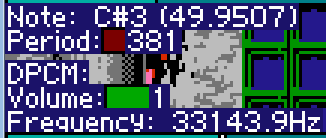
Image

I'm honestly not sure how to read the information SoundDisplay is giving me. Some of the terminology is familiar to me like note, frequency, and volume, but I know DPCM is a little more complex and that these three values don't relate to the sound as directly as say on the triangle channel (or perhaps I'm mistaken--which wouldn't too far fetched).

While I can muck through some of the documentation for APU DMC, the majority of it goes over my head.
I'm left with not knowing how to determine the bit rate of my sample and what to do with the "Delta Counter Start" value in RJDMC.
Moreover, I'm still so new to all of this, that I don't know how to track down the proper addresses in my ROM file for useful values.

(I apologize way in advance as I know this is pretty "hand-holdy")
Re: Replacing DPCM samples in a NES ROM
by on (#200765)
The image you posted has been replaced with the following notice:

Quote:
PLEASE UPDATE YOUR ACCOUNT TO ENABLE 3RD PARTY HOSTING

3rd Party Hosting Usage: 100%

FOR IMPORTANT INFO, PLEASE GO TO: http://www.photobucket.com/P500


Photobucket buries its subscription pricing page, presumably to ease the sticker shock of learning that the cheapest plan with 3rd party hosting costs $399 per year. Who is willing to donate $399 for spookgoblin's first year of Plus 500 photo hosting?
Re: Replacing DPCM samples in a NES ROM
by on (#200766)
spookgoblin wrote:
I'm honestly not sure how to read the information SoundDisplay is giving me. Some of the terminology is familiar to me like note, frequency, and volume, but I know DPCM is a little more complex and that these three values don't relate to the sound as directly as say on the triangle channel (or perhaps I'm mistaken--which wouldn't too far fetched).

"Period" is a number 0-15 indicating the DPCM samplerate. This is the same as "quality" and "pitch" in RJDMC except those are givenin hexadecimal (0-F) instead.

"Sample" gives a memory address, and the data length in bytes.

To figure out where that memory address maps to ROM, you can use the hex editor. While still paused during that sample's playback, open the hex editor in NES Memory view. Use "File > Go to address" and type in that address (e.g. C040), which will highlight it in the editor. Right click that byte and choose "go here in ROM" and it will take you to the ROM view which will show you the address of the data in the ROM file (the exact address should be in the window title, e.g. "ROM Offset 0x03C050").

$ and 0x are both just prefixes that mean "hexadecimal". There's a bit of inconsistency about which prefix to use (if any).

Anyhow, once you have that you should be able to find the location of the sample in the ROM file with a hex editor.


The reason for having to use the hex editor to decode this is just the NES only has a narrow window of visible memory, so cartridges swap pages of data from the ROM in and out as needed. The hex editor knows how they are mapped at any given time (that's why you have to do it while paused during the sample's playback-- that's the only time its page is guaranteed to be swapped in).
Re: Replacing DPCM samples in a NES ROM
by on (#200773)
rainwarrior wrote:
Anyhow, once you have that you should be able to find the location of the sample in the ROM file with a hex editor.

Ahh and the trail of bread crumbs is visible yet again! All very helpful information, rainwarrior. Again, thank you!
I think even a novice like me will be able to make sense of your detailed breakdown (fingers crossed).
I'll take another crack at it tomorrow morning (or whenever the fiance is away long enough for me to scheme and tinker behind her back).

Also: sorry everyone about that ugly Photobucket ad. I had no idea that that would happen. I'd been using them for years without issue -_-
Re: Replacing DPCM samples in a NES ROM
by on (#200777)
tepples wrote:
The image you posted has been replaced with the following notice:
As an awful workaround, at least in firefox, one can right click, view image in new tab, and then (due to the Referer changing) view it. The image is of Castlevania in the background, and the following text:
Note: C#3 (49.9507)
Period: 381

DPCM:
Volume: 1
Frequency: 33143.9Hz
Re: Replacing DPCM samples in a NES ROM
by on (#200778)
spookgoblin wrote:
Also: sorry everyone about that ugly Photobucket ad. I had no idea that that would happen. I'd been using them for years without issue -_-

We have an attachment feature in this forum, so please use that instead.
Re: Replacing DPCM samples in a NES ROM
by on (#200780)
lidnariq wrote:
tepples wrote:
As an awful workaround, at least in firefox, one can right click, view image in new tab, and then (due to the Referer changing) view it. The image is of Castlevania in the background, and the following text:
Note: C#3 (49.9507)
Period: 381

DPCM:
Volume: 1
Frequency: 33143.9Hz


Eww! That is an awful workaround!
Thanks for pulling that info :)

And duly noted, thefox. I'll be sure to use the attach feature in the future.
Re: Replacing DPCM samples in a NES ROM
by on (#200781)
spookgoblin wrote:
sorry everyone about that ugly Photobucket ad. I had no idea that that would happen. I'd been using them for years without issue -_-

The policy changed less than a month ago according to "Photobucket Breaks Image Links Across the Internet" by Matthew Humphries.
Re: Replacing DPCM samples in a NES ROM
by on (#200796)
Which seems to happen on every hoster eventually. Tinypic did that a couple years ago, and imgur about a year ago IIRC.
Re: Replacing DPCM samples in a NES ROM
by on (#200862)
Okay, so I think I've narrowed everything down, but I need some time and confirmation to be sure!

Essentially, now that I have found the address in the ROM file of the sample that needs to be replaced, I now have to use an external hex editor to open up my new sample and manually copy in all the byte data to overwrite the old sample, right?
I'm double-checking because, according to SoundDisplay, I've got 177 bytes to manually plug in (I'm starting to see why a script would be nice!)
Re: Replacing DPCM samples in a NES ROM
by on (#200878)
spookgoblin wrote:
Okay, so I think I've narrowed everything down, but I need some time and confirmation to be sure!

Essentially, now that I have found the address in the ROM file of the sample that needs to be replaced, I now have to use an external hex editor to open up my new sample and manually copy in all the byte data to overwrite the old sample, right?
I'm double-checking because, according to SoundDisplay, I've got 177 bytes to manually plug in (I'm starting to see why a script would be nice!)

No need for manual work, use Copy & Paste. If you're using Windows, try HxD. It's a very nice (and free) hex editor. The menu option you're looking for is Edit -> Paste write (use this instead of Paste insert to avoid changing the ROM size).
Re: Replacing DPCM samples in a NES ROM
by on (#200933)
Ahahaha!

You have all successfully guided me through this hurdle. The sample is ringing out loud and clear in my ROM and it has brought a massive smile to my face.
Thanks for your help, everyone. I can't thank you enough!

As a fun side note: the sound I ended up using was a tiny snippet of my fiance's laugh that I recorded while she wasn't paying attention :)
It will be extra fun to be able to tell her that the sound effect is her own voice!
Re: Replacing DPCM samples in a NES ROM
by on (#201077)
Honnestly if your goal it to have this noise sound more female, it should be simple to simply have the same sample playing at a faster speed. I'm fairly confident that's what CV3 does when playing with Sypha Benlades as a playable character. So basically only the value written to $4010 have to change.
Re: Replacing DPCM samples in a NES ROM
by on (#201097)
Quote:
Honnestly if your goal it to have this noise sound more female, it should be simple to simply have the same sample playing at a faster speed. I'm fairly confident that's what CV3 does when playing with Sypha Benlades as a playable character. So basically only the value written to $4010 have to change.


Thanks for the suggestion!
Fortunately, I've already got my sound plugged in (even if it took a few extra steps) and I'm really, really happy with the results. Even if the difference is minuscule, I think it will be way cooler to be able to say that it's her own voice :)

That's a really neat trick, though. I'll have to keep it in mind for future SFX!